

- you want to launch your first App Events campaigns on Meta Ads
- you did not decide yet whether you will use facebook sdk, or another tool like revenuecat or an MMP to track your campaigns.
(I also turned this documentation into a video if you would rather watch it)
Steps
- decide how you will send data to meta ads
- integrate sdks
- configure developers.facebook.com
- configure facebook events manager
- launch your campaign on ads manager
- analyze your ROAS (Return on Ad Spend)
Decide how you will send data to meta ads
Here is a simple representation of what the tools you need to work with:- your app can track installs, start trial and purchase events. you have lots of options for tools that can track & send these events. of course you don’t want to integrate all of them!
- ad networks such as Meta Ads need to receive these events, with the correct parameters (parameters = your users’ device info) that they need in order to attribute the results of their campaigns and optimize them
APP
The app tracks eventsevents you can track:
- Install
- Start Trial
- Purchase: events and values of these events
- SKAN (iOS only) ✓
- Facebook SDK ✓
- TikTok SDK
- AdServices (iOS only)
- Firebase SDK
- Subscription analytics tools: RevenueCat, Qonversion, Adapty, Purchasely…
- MMPs: Adjust, Appsflyer, Tenjin, Singular… ✓
product analytics tools : amplitude / posthog / mixpanel…customer data platforms : segment / rudderstack …- Reverse ETL
- Custom built stuff
AD NETWORKS
The ad networks need to receive events.
- Meta
- TikTok
- Google Ads
- SDK networks: Applovin, Unity, Mintegral…
- Apple Search Ads
run your first tests with the facebook sdk
- if this is your first test, you need to go fast. just implement the Facebook SDK in your app and track the events you want to optimize for using the client side sdk. it works well, it is easy to setup, and it’s free. I would advise you to just track start_trial and purchase events, for the sake of simplicity. and again, I insist : track your events using the Meta sdk, on the client, not using anything server-side. I’ll explain why a bit later below. ⚠️ Important: if you want AEM eligibility with the SDK alone, you MUST also implement Advanced Matching via
setUserData()- pass hashed email, phone, etc. Without this, your iOS AEM campaigns won’t be eligible. - implement a subscription analytics tool like RevenueCat / Qonversion / Adapty / Purchasely in order to understand your subscription revenue per user, but don’t use it to send events to Meta Ads directly - these tools’ integrations with Meta’s Conversions API are currently broken.
- I usually recommend to implement an MMP only when you had some positive signs when it comes to user acquisition. In fact, your MMP is going to be the central hub for your decisions when if comes to campaigns budgets allocation and ROAS analysis. So I’m not saying you shouldn’t implement an MMP - rather that you should validate that your app has acquisition costs that will enable you to use paid user acquisition as a growth channel.
disableSKAdNetworkSupport() method for this). You’ll still get attribution data for both networks, but only one will handle the conversion value mapping.
That said, if you’re scaling on multiple paid channels and need unified SKAN management across all of them, that’s usually when an MMP starts making sense.
The same logic applies to Google Ads: you can use the Firebase SDK alongside Meta’s & TikTok SDK. Just make sure only one SDK manages SKAN conversion values.
Why not an MMP now ?
Benchmarking MMPs in order to choose the one you’re going to stick with for years, spending hours reading their docs and implementing all of their features, etc, takes a lot of time. And it’s probably not your priority at this point.
Think about where you are in your journey with this app you are trying to promote. You probably just need to validate whether your first campaigns show some positive signs, right ?
- Example of a positive sign : your cost per install and cost per trial are close to your niche’s benchmark, and your d7 LTV (net of VAT and App Store / Play Store fees) show that you are profitable , or close to it, 7 days after install 🚀
- Example of a negative sign : your first campaigns on iOS US showed a $20 cost per install on the Meta Ads dashboard, while your niche’s average lifetime value on a per install basis is $1, and your D60 LTV on RevenueCat for iOS in the US $0.20. in this case, you are very far from profitability. so maybe you should fix your product’s unique value proposition, or your creatives and targeting, rather than trying to improve tracking and ROAS analysis 🤷
at some point you will probably need an MMP.
MMPs are great ! Just don’t spend too much time implementing one if you will end up throwing away your app in 2 weeks because nobody wants it and it was faster to throw it away and create a new one. Implementing an MMP can be complicated : their docs are long, complex, talking about complex stuff you’ve never heard of , etc. If you complain about the Facebook SDK’s documentation, then you’ll be horrified by MMPs documentations. If you use an MMP, send your start trial and purchase events to from RevenueCat to your MMP, and then send these events from your MMP to Meta Ads. RevenueCat → MMP → Meta Ads Also, there’s a lot of content on the internet about the fact that you can avoid working with an MMP - you can, but it’s even more complicated than working with one 🤣 so if you don’t know what you’re doing, I recommend sticking with the classic methods! 99% of successful apps and games use MMPs to track their paid user acquisition. my recommendations for MMPs:- Appsflyer is too expensive if your needs are basic. go with them if you have a specific use case they cover and others dont.
- Adjust and Singular are great
- Tenjin is great if you’re looking for a cheaper solution
which campaign objective should you choose?
Here are the most common App Promotion campaign objectives. Even ROAS campaigns are a bit too advanced if you’re just getting started, but understanding that Meta is able to make their campaigns work in such a way will be helpful for you to understand how Ad networks work. If you are not eligible to anything else than App Install campaigns, then make sure your events are correctly tracked, with the correct parameters, and launch an App Installs campaign to enable Meta to collectstart_trial or purchase events faster than if you solely had organic traffic.
Other details at the “Campaign” level :
- Campaign bid strategy : when you launch your first campaign, you want to understand what your CAC (Customer Acquisition Cost) is. You don’t want to give too many constraints to Meta at this stage. So I recommend you to select “Highest Volume or Value”.
- Attribution: this is important ! more about it below, in the “which campaign type should you launch?” section
- Cost per result goal: None. This is aligned with the fact that you’ve selected “Highest Volume or Value” for the campaign.
- Attribution window : when configuring App Events & ROAS campaigns, you will see that you can change the Attribution Window for a given campaign, by using D1 or D7. go with D1 for simplicity and think about this later. Meta mostly optimizes for events happening at D1 anyway.
- Incremental Attribution : You’ll also see you can select “Incremental Attribution” as opposed to “Standard”. Go with the standard, as Incremental is a new thing, and Meta Ads reports what Incremental would have given you anyway.
which campaign type should you launch?
By “campaign type”, I mean “attribution method” here, as opposed to “campaign objective” which we discussed just before. For iOS, Meta has 2 main attribution methods, and 1 for Android. Let’s compare them :
As you can see, the attribution method is different for each one, so obviously each campaign type is going to give you different results.
you’ll want to make sure you are eligible to run AEM campaigns, by sending Meta all the parameters it requires to run these campaigns, and i’ll explain how in detail below. very often these campaigns are the most profitable app promotion campaigns on iOS.
I’m not talking about web to app or web to web flows here, which are an entirely different setup. This is for App Promotion campaigns. I advise you to start with these, and only go for Web to App campaigns when you spend at least $10k per month profitably on Meta Ads. Again, this is just my opinion, feel free to experiment if you think your product can have much better results using web to app or web to web flows. Strategies that include the web work well, it’s just not the thing I’d recommend if this is your first campaign on Meta Ads.
diving deeper into what meta ads needs as parameters for the events you send
the reason why I recommend you to use Meta SDK is that it makes collecting the right parameters simple for iOS AEM Attribution and SKAN Attribution. Android attribution is super simple in comparison, but you want your campaigns to work for iOS. Here’s the list of the parameters you can send to Meta Ads as part of theinstall, start_trial and purchase events, depending on the campaign type you want to run (iOS AEM app campaigns, iOS SKAN App Campaigns, or Android App Campaigns). Some are required, some optional, depending on campaign types. Here’s a full breakdown. If you think something is false here, this documentation is open source and you can contribute to it to correct me. I’m pretty confident though 🙂
As you can see, all campaigns types use different data points. As a result, you shouldn’t be surprised to have very different results between each of these campaign types, especially for SKAN campaigns as they don’t use any ID that would help identify people personally.
Two paths to iOS AEM eligibility
Path 1: MMP / Conversions API (Server-to-Server)- Requires IDFV + IP Address for AEM eligibility
- Your MMP collects the IDFV and sends it via the Conversions API
- This is what most MMP documentation refers to
- The Facebook SDK does not send IDFV (vendor_id) - this was confirmed via network traffic analysis
- Instead, AEM eligibility depends on Advanced Matching - user data you provide via
setUserData() - Advanced Matching includes hashed: email (em), phone (ph), first name (fn), last name (ln), etc.
Traffic analysis of real apps showed a clear pattern:
- Apps with multiple Advanced Matching fields populated → AEM eligible ✅
- Apps with only 1 field (e.g., email only) → AEM NOT eligible ❌
- Apps with no Advanced Matching data → AEM NOT eligible ❌
setUserData() to be eligible for AEM campaigns.- Documentation: https://developers.facebook.com/docs/app-events/advanced-matching/
- Use
setUserData()to pass hashed user information (email, phone, name, etc.) - The more fields you populate, the better your match quality
start_trial and purchase from the client using Meta’s SDK and not through Meta’s server-side solution called “Conversions API” is because you might think RevenueCat can send this to Meta for you directly as they have an integration with Meta’s Conversions API; however, RevenueCat’s integration does not work well, and it is the same for all of its competitors (I’ll update this if it changes, and things move fast so I expect this to change soon!).
TL;DR : don’t waste time trying to make RevenueCat’s Meta Conversions API integration work (like I did 😅): it doesnt (yet) ! Meta forces you to use only 1 source for all your events if you want to use AEM.
However, RevenueCat’s integrations with MMPs work perfectly well, and MMPs correctly pass the required parameters to Ad Networks. and Meta considers your MMP as a single source. So when you’re past your first tests, use an MMP alongside its integration with RevenueCat as your events source for Meta Ads.
integrate the Meta SDK and setup the ATT Prompt on iOS
here are the docs you need to follow :- Meta App Event Tracking: https://developers.facebook.com/docs/app-events
- Get Started with App Events on iOS / Android / Unity : https://developers.facebook.com/docs/app-events/getting-started
- Add your events (Start Trial & Purchase) -> VERY IMPORTANT : The FB SDKs “Automatic Event Tracking feature” seems to be completely broken for a while ⚠️ Make sure you deactivate automatic event tracking in your app, and track your events within your code) https://developers.facebook.com/docs/app-events/getting-started-app-events-ios#step-7—add-app-events
- Apple’s App Tracking Transparency: Request user authorization to access app-related data for tracking the user or the device (IDFA) https://developer.apple.com/documentation/apptrackingtransparency
- Advertiser Tracking Enabled (pass IDFA and ATE status to the Meta SDK on iOS) : https://developers.facebook.com/docs/app-events/guides/advertising-tracking-enabled/
- Advanced Matching (CRITICAL for SDK-only AEM eligibility): https://developers.facebook.com/docs/app-events/advanced-matching/ - Use
setUserData()to pass hashed email, phone, name, etc.
configuring developers.facebook.com
the docs for “Get Started with App Events” told you to create an account on developers.facebook.com make sure you also :- add your privacy policy and terms & conditions under App Settings > Basics
- under “Publish”, click on “publish” and it will be in “Live Mode”
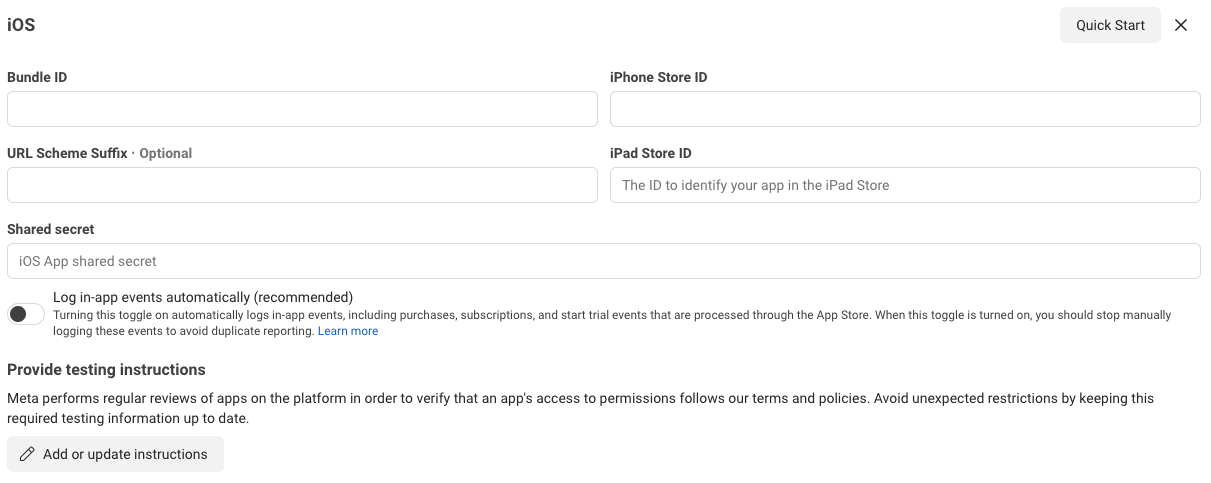
- still under “Publish”, click on “add platform” -> iOS. Then just adding the iPhone Store ID is fine. as stated above, don’t use “Log in-app events automatically” even if it is written “recommended”. This is broken for iOS (source 1, 2). Might work for Android but I’m not sure. I recommend your to log your Standard Events (Start Trial, Purchase) manually again. and until Meta fixes automatic event tracking, you don’t need to input your Shared Secret either.
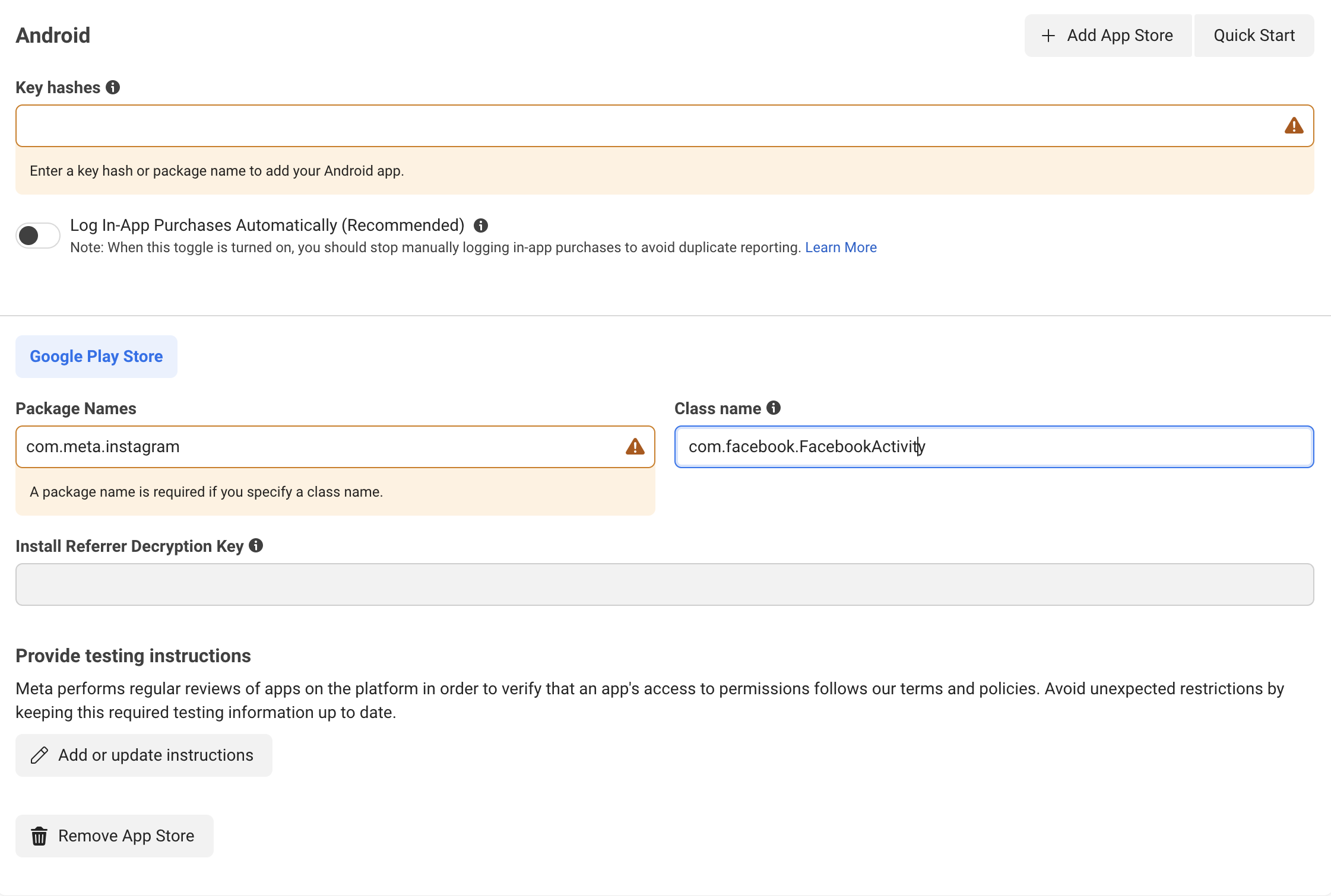
- repeat for Android. input your Key Hashes, package name (e.g. bundle ID) , and you can leave “com.facebook.FacebookActivity” for “class name”.
accepting Meta’s AEM Terms
you need to sign this for your app: https://developers.facebook.com/advanced_mobile_measurement/terms now you’re good for developers.facebook.com !linking your app to your Business Manager
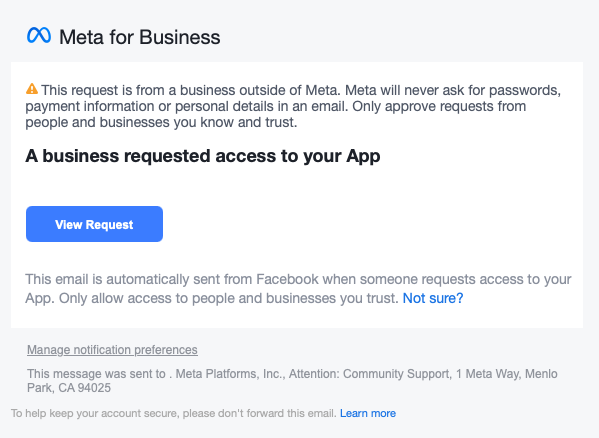
you should have already created your Business Manager on business.facebook.com now under business settings > accounts > apps, click on “add”. then click on “connect an app id” and input your App ID from developers.facebook.com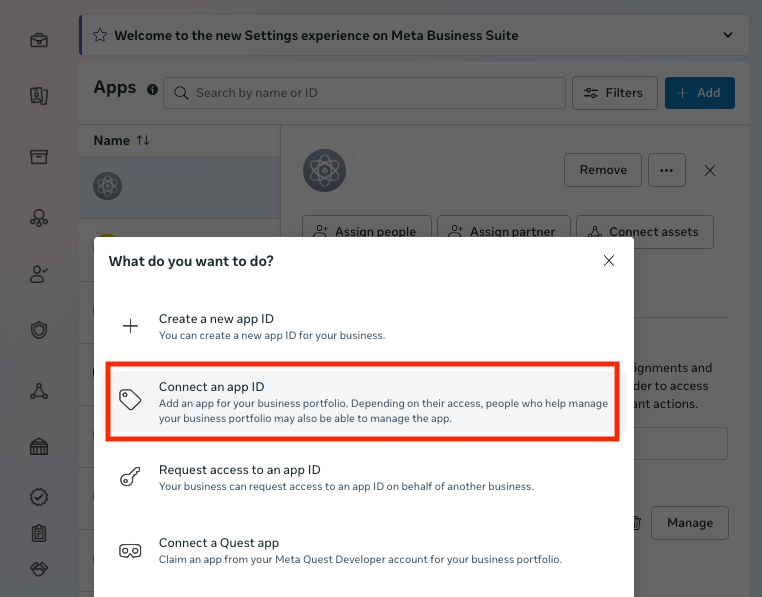
configuring Meta Events Manager for AEM campaigns & SKAdNetwork for SKAN campaigns
if you’ve correctly completed the steps above, you’ll need to check the Meta Events Manager interface to see whether you are eligible for AEM campaigns. It’s right here : click on your dataset https://business.facebook.com/events_manager2/ under “Overview” look at your events. where are they coming from (Meta SDK or your MMP or both? it’s ok to have both by the way), and do you see as many as you thought you should? Ideally it should look something like this: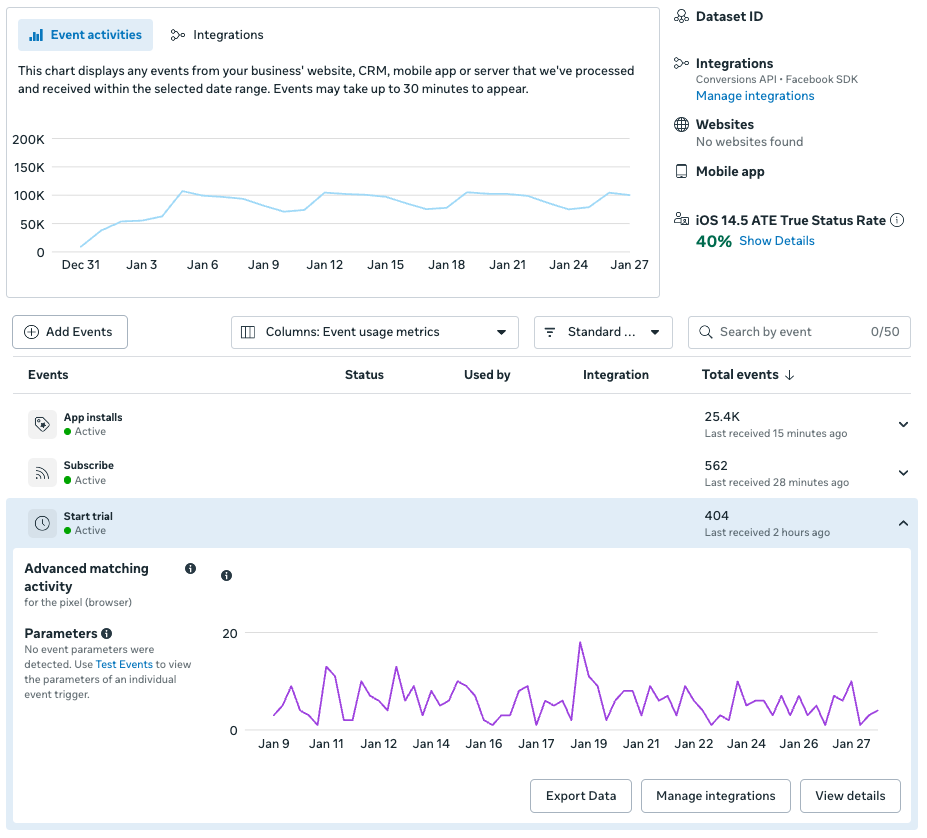
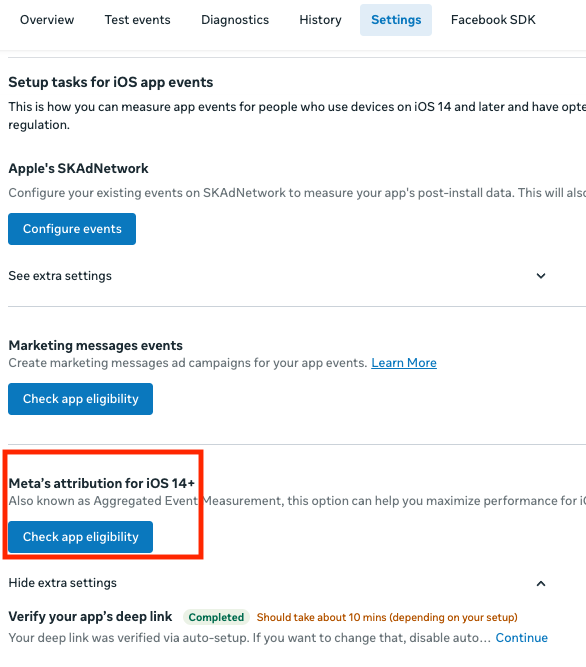
check whether you are eligible for AEM campaigns
Under “Meta’s attribution for iOS 14+”, click on “check app eligibility”. Don’t worry about verifying your app’s deep link : this is for re-engagement campaigns, and here we are launching your first user acquisition campaign. This is different from re engagement. If you see something like this for the events you want to run campaigns for (App Installs, Start Trial, Purchase), you’re eligible for AEM campaigns. Congrats ! 🎉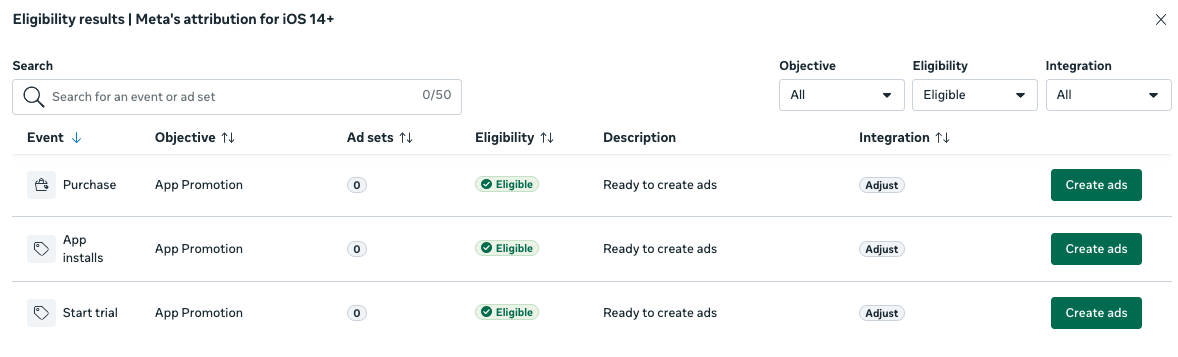
Then let’s configure SKAdNetwork
to be clear, AEM campaigns don’t use SKAdnetwork, so you can skip this section if you’re only launching an AEM campaign. Under “Apple’s SKAdNetwork” click on “configure events”. I’m not going to guide you here, follow through instructions whether you’re using “SKAdNetwork for the Facebook SDK” or your MMP’s SKAN configuration. Having something like this is fine to start your first SKAN campaigns.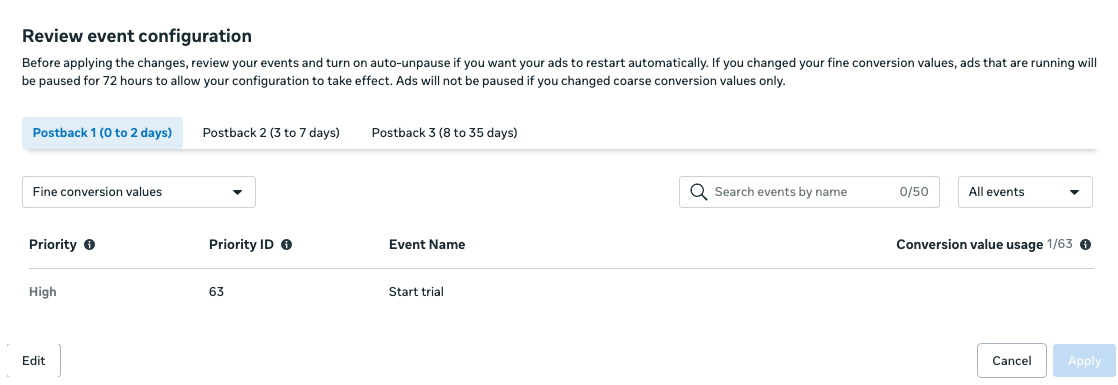
how about Android ?
not much ! make sure you’re collecting all the parameters stated above for android through the SDK you are using, and you should be good.now we can launch your campaign !
I recommend you to launch campaigns on iOS in the US, if you have enough budget. iOS is the biggest OS for subscription apps, and the US is the biggest market. Very often, 50% of revenues for apps and games available worldwide come from the US alone, so if your test campaigns work well on iOS US, you are likely to be able to grow. Run a test for at least 7 days, with at least $50 of daily budget for each campaign. Ideally, you should get 50 events per week on each campaign to consider that your budget is enough to give you interpretable results, so your ideal weekly budget should be your expected cost per goal * 50. use broad targeting (e.g. no restriction on targeting) and try to test at the very least 5 creatives (images or videos). I would recommend to launch an iOS AEM Campaign, alongside a SKAN campaign if you have enough budget, and see which ones drive the best results. usually it’s iOS AEM. If you have an Android app, launch a campaign on it too. If you implement the Meta SDK and track all the required parameters then you will be able to launch these campaigns with no issues. Here’s a recap:- 1 campaign for iOS AEM, 1 campaign for iOS SKAN, 1 campaign for Android if you have Android
- only 1 ad set per campaign, with 5 ads minimum in this ad set. when you have new creatives, just add them to the same ad set to test them.
- $50 per day each, minimum. ideally, your weekly budget should be your expected cost per goal * 50, as you ideally need 50 events per week. if this is too much for you, target cheaper countries.
- let the campaign run for 7 days minimum. check it every day, stop it if you don’t have any install on the first 24h for iOS AEM & Android, or the first 72h for iOS SKAN.
- targeting : US, broad (no targeting restriction), 18 - 65+ , male & female
I’m not even talking about creatives here ! there’s a ton of resources to help you create awesome creatives. There are plenty of good resources online to get started for free though. Keep in mind that apart from your product’s relevance and the details of your campaigns, your creatives will be your most important levers. We often say 80% of your campaigns’ success is due to your creatives!
Analyzing your return on investment
Let’s first talk about VAT and App Store fees
in my opinion talking about “gross ROAS” in a bad idea. You want to talk about your net ROAS, e.g. after VAT and fees. Keep in mind that Purchases tracked through the Meta SDK will report the raw amont of your transaction, ex: $9.99 not minus VAT and App Store fees. If you want to understand your net revenue (=“Proceeds”), here’s a comparison betwen the US (no VAT) and France, all in USD to simplify.Formula Summary
- US (no VAT): Proceeds = Price × (1 - Commission Rate)
- EU (VAT inclusive): Proceeds = [Price ÷ (1 + VAT Rate)] × (1 - Commission Rate)
Small Business Programs
- Apple App Store: 15% if you earned under $1M the previous calendar year
- Google Play Store: 15% on the first $1M of current year revenue, then 30% beyond
my simple method for ROAS analysis on your first campaigns
I recommend you to use a use simple methods to analyse your first campaigns results. here is one I would recomment : for each campaign, log progress in a spreadsheet like this. your goal is to find the campaign that gets your the best ROAS.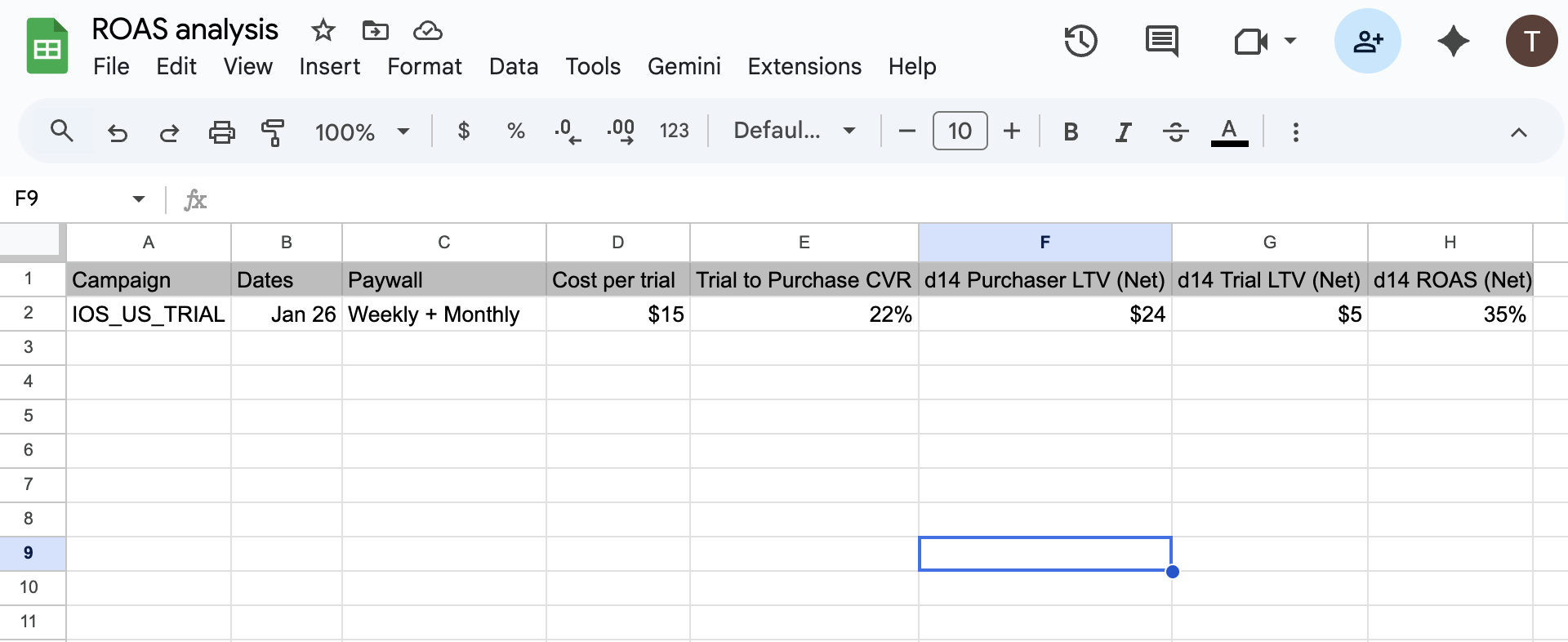
closing thouhts
maybe you won’t crush it on your first try, but the fastest growing app companies use processes just like this one for the release of their new apps :- you release your app on the store
- you see whether there’s interest for it on iOS US on Meta (or any other channel)
- if there’s absolutely no positive sign you throw it away or completely pivot your app’s unique selling point.
- If you have positive signs, then you try to have more sophisticated User Acquisition operations and improve your product in order to optimize your campaign performances